
Manage your workspace
Plans and usage
Understand your workspace allowance, usage view and billing controls.
What it is
Plans and usage show the current workspace allowance, site and seat use, and billing controls.
Why use it
Use this guide to understand current workspace capacity and make a plan change when your team needs one.
Before you start
- Only workspace owners and admins manage billing controls.
- Only workspace owners and admins can open billing controls or make a plan change.
How to use it
- 1
Open the workspace plan view
Open Settings and choose the billing or plan section.
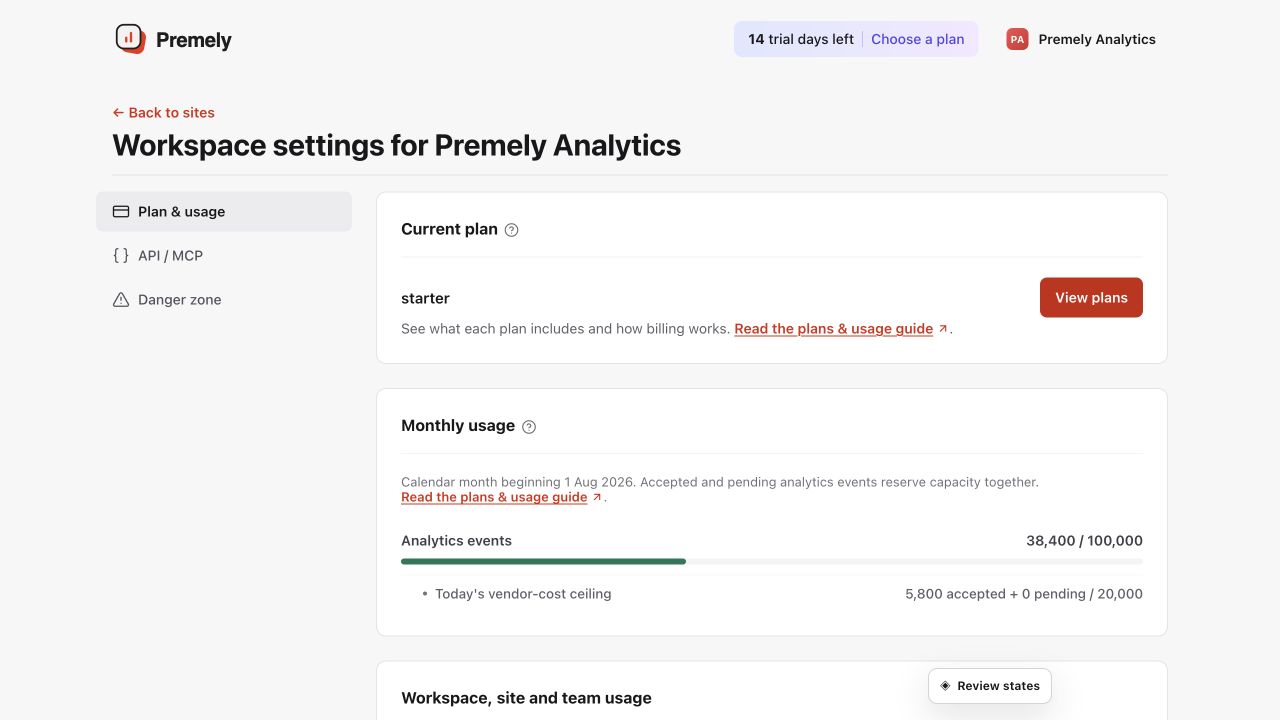
Check both the current plan and measured usage before changing billing. Shown in Premely with disposable demo data; your values will differ.
- 2
Review current use
Check the displayed monthly event use, daily safety ceiling, sites and seats before deciding whether a workspace needs a change.
- 3
Read the recommendation as guidance
Use a plan recommendation to understand current workspace capacity, then choose the plan that fits the next stage of your work.
- 4
Complete the plan change
Use the billing flow in your workspace to review the change before you confirm it.
What to expect
Billing controls are workspace-scoped
Plan changes, invoices and payment controls belong to the workspace, not to one person’s profile.
Usage warnings are operational signals
Use an available warning to review the workspace, not as a reason to assume automatic overage or upgrade behaviour.
Useful ways to apply this
A workspace review
Check site and seat use before inviting people or adding another website.